Computer skills from scratch·The workshop and the bench·Lesson 173 of 180
The hard drive that clicks and the solid-state cure
 Ellis Dennis GrahamFounder, Cyber Elias Academy 2026-09-16 4 min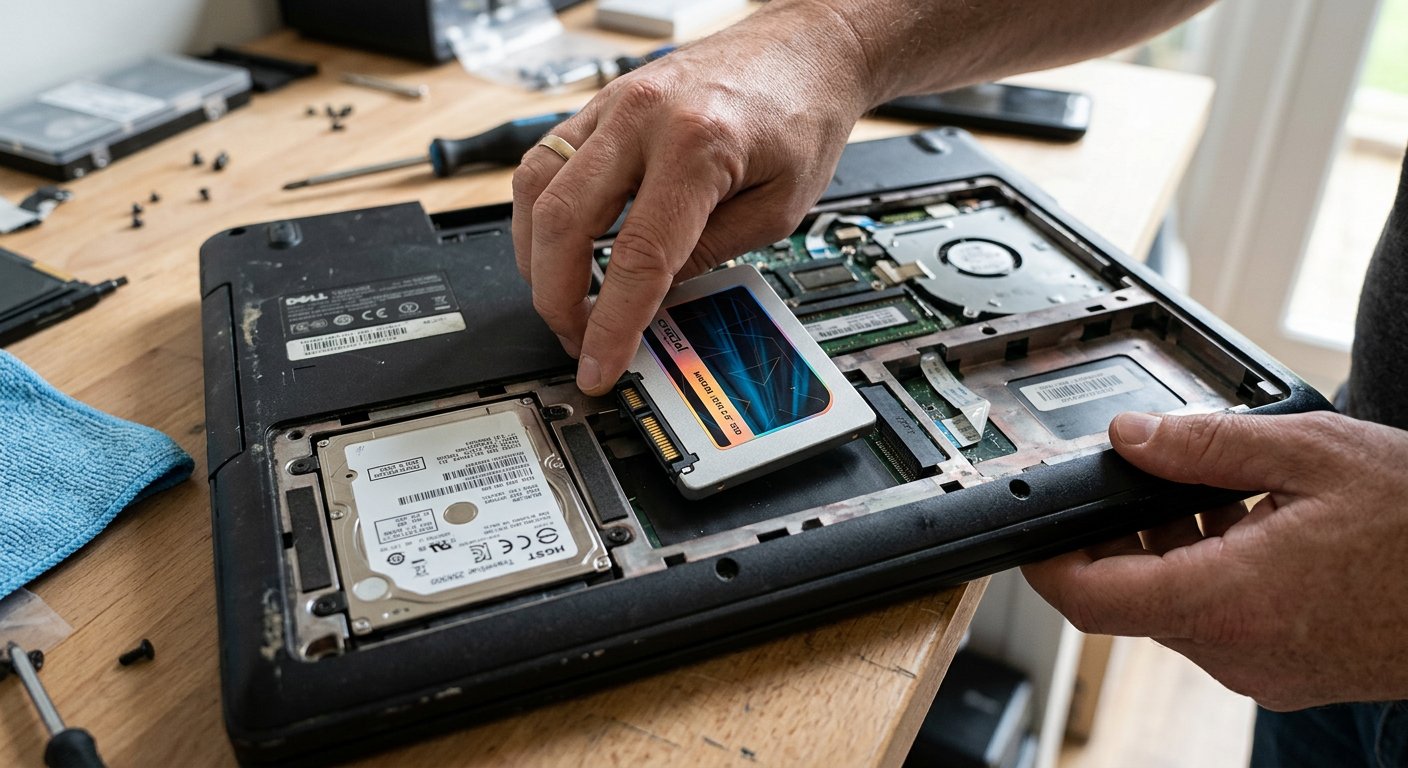
Tick, tick, tick, click. The tiny record player spinning inside an old laptop, why the clicking needle means stop immediately, and how a solid-state drive gives an old machine new wings.
You are working late at night in a quiet room. The generator has been turned off, the house is still, and under your left wrist you suddenly hear a strange, tiny rhythm: tick... tick... tick... click. On the screen, your document freezes. The mouse pointer turns into a spinning blue circle. Five seconds pass, ten seconds pass, and then suddenly the machine resumes working as if nothing happened. You breathe a sigh of relief. But three days later, the clicking sound returns, louder and more frequent, like an angry little beetle trapped inside the plastic case.
You are listening to the heartbeat of an old mechanical hard drive, and that clicking sound is the most urgent warning a computer can ever give you. Inside that metal box under your palm sits a stack of real, physical shiny glass plates spinning around thousands of times every single minute. Hovering just a hair's breadth above those spinning plates is a microscopic metal needle flying back and forth, reading your letters, your family pictures, and your business records, exactly like an old gramophone needle playing a music record.
The needle that scratches and the flash rescue
Now picture what happens when you bump the table, drop your laptop into your backpack while it is still running, or carry it roughly across the parlour. That flying needle crashes down directly onto the spinning glass plate, scratching the surface. When the needle tries to read a scratched spot and finds nothing, it snaps back to its starting post with a dry click: *tick, tick, click.* The golden rule of the workshop is simple and absolute: the very day you hear that clicking sound, STOP. Do not restart the computer five times. Do not hit the laptop with your palm hoping to 'settle it.' Every single click is that sharp needle scratching away more of your irreplaceable files. That very hour, plug in a USB flash drive and copy your school certificates, passport scans, and important papers before the motor gives up.

You don't have to guess whether your drive is dying. Download a tiny, free tool called CrystalDiskInfo. Open it. If the circle says 'Good' in blue, your drive is peaceful. If the circle is yellow and says 'Caution', the plate is already beginning to fail. And when it fails, do not go to the market to buy another old mechanical drive! That is yesterday's technology. Buy an SSD (a Solid State Drive).
What is an SSD? An SSD has zero spinning plates, zero needles, zero motors, and makes zero sound. It stores your files on quiet flash memory chips, exactly like the memory card inside your smartphone. If you drop it on the floor, nothing scratches. It uses one-third of the battery power, stays completely cool, and reads files six times faster than an old mechanical drive. For twenty-five thousand to thirty-five thousand naira, replacing an old spinning drive with an SSD turns an eight-year-old sluggish laptop into a machine that boots Windows in fifteen seconds flat. It is the single greatest transformation you can give an older computer.

- If you hear clicking, ticking, or grinding under your palm rest, copy your important documents onto a flash drive that very day.
- Never hit, shake, or drop a computer while it is running: the spinning needle will scratch your files off the glass plate.
- Check your drive health with CrystalDiskInfo: a yellow Caution circle means the drive is reaching the end of its life.
- Replacing an old mechanical drive with an SSD is the best money you can spend: boots in 15 seconds and never clicks again.
Retire the spinning plate
Spinning mechanical plates served our parents well, but a computer that travels in your bag across bumpy roads belongs on quiet solid-state storage. Keep your files safe on silent flash memory, and leave the clicking behind. Next: the terrible accident that happens in half a second — tea, water, and the spill on the keyboard.