Computer skills from scratch·The workshop and the bench·Lesson 174 of 180
Water, tea, and the spill on the keyboard
 Ellis Dennis GrahamFounder, Cyber Elias Academy 2026-09-17 4 min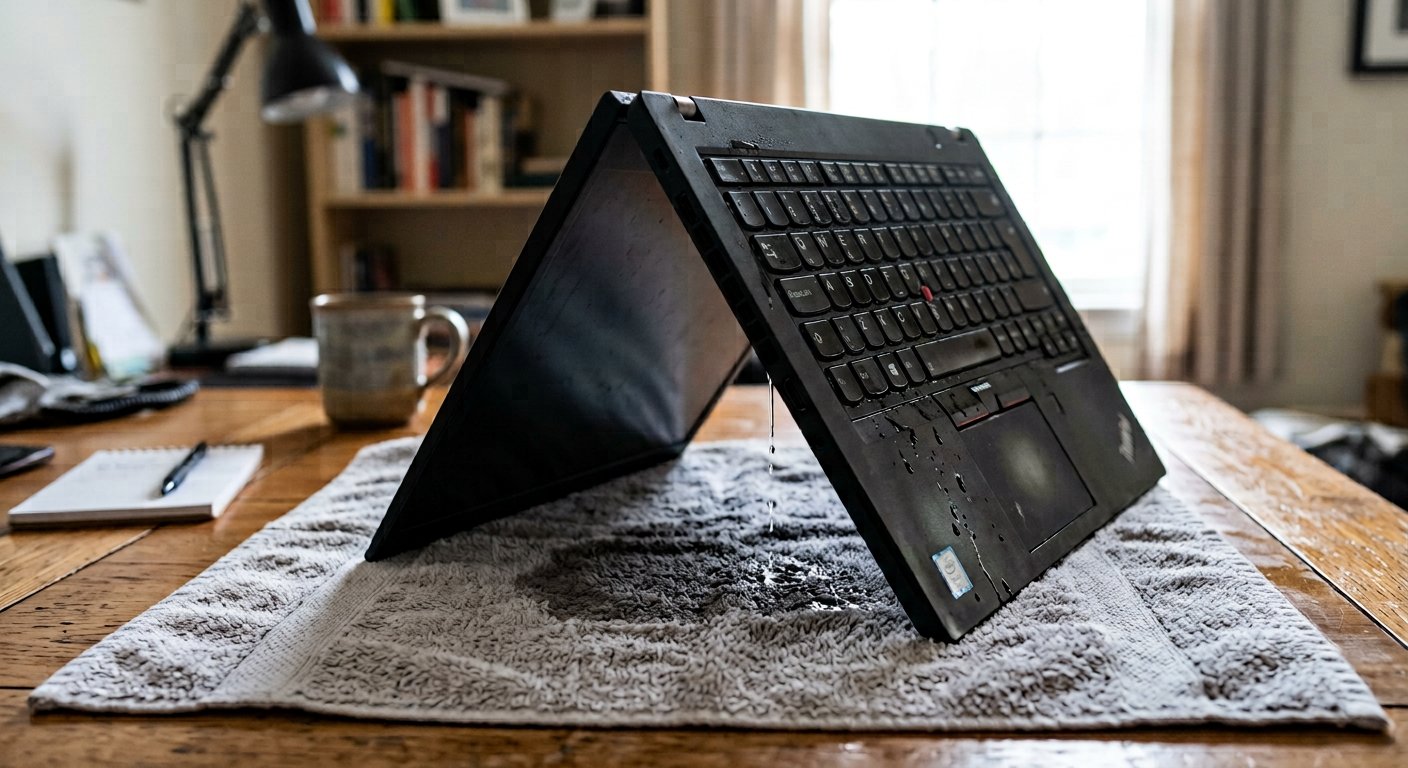
The mug tips, tea floods the keys, and panic takes over. The immediate five-second drill: pull the plug, hold the button, the upside-down tent, and why raw rice ruins machines.
You are sitting at your desk with a warm mug of tea or a cold sachet of pure water beside your elbow. You reach across to grab a pen, your forearm knocks the cup, and a brown wave of sweet tea pours directly across the letters on your keyboard. In that terrible second, your brain screams. What do most people do? They freeze in shock. Then they grab a dry handkerchief and start gently wiping the surface of the keys while the screen is still brightly shining. Or worse: they click 'Start', then click 'Power', then click 'Shut Down', and wait patiently while Windows takes forty seconds to close background apps. Those thirty wasted seconds are the exact moments when a cheap spill turns into a completely burnt laptop.
Here is the secret of water: pure water does not burn a computer. What burns a computer is water meeting electricity. When water containing sugar, milk, or tap minerals sits on a board carrying electric current, the liquid acts like a hundred tiny copper wires touching parts that should never touch. Sparks fly across microscopic tracks, chips pop, and the board fries in an instant. Your only goal in the first five seconds of a spill is to kill every drop of electricity before the liquid can seep down through the keyboard floor.

The five-second drill and the dangerous rice myth
Memorize these four steps so your hands move without thinking. Step one: do not gently unplug the charger — rip the cord straight out of the laptop side with one hard pull. Step two: press your thumb hard onto the laptop's power button and HOLD IT DOWN. Do not let go. Do not wait for Windows to say goodbye. Keep pressing until all screen lights and fan sounds die completely. Step three: if the machine has a removable battery on the bottom, pop the latches and pull it out instantly. The computer is now completely dead and safe from electrical sparks.
Step four: open the laptop screen halfway, turn the whole machine completely upside down so the keyboard faces the floor, and set it standing on the table like a camping tent — an upside-down 'V' — on top of a dry cotton towel. Look at what you just did: gravity is now your best friend. Instead of the water pooling down into the delicate green motherboard below, every single drop is trickling harmlessly down through the keycaps onto your towel.
Now listen carefully: never, under any circumstance, bury a wet laptop in a bag of raw uncooked rice. That is an internet fable that has destroyed thousands of computers. Rice does not draw moisture out of a closed metal laptop casing; what rice actually does is dump fine white flour dust and broken rice grains into your cooling fan, headphone jack, and USB ports. When that dry starch mixes with the dampness inside, it turns into thick, gummy porridge that seals fan bearings and ruins keys forever.

- Hold the power button down hard for 10 seconds: kill internal power immediately, never wait for a normal Windows shutdown.
- Rip the charger and battery out the same second: no electricity means no sparks, no short circuits, and no burnt boards.
- Stand the laptop like a tent on a dry towel: let gravity pull liquid down onto the cloth away from the motherboard.
- Never use raw rice, and never use a hot hair dryer: heat melts the thin plastic keyboard membrane and warps keycaps.
The 48-hour patience rule
The hardest part of a spill is the waiting. Leave the laptop standing in the tent position in a breezy room with a ceiling fan running for forty-eight full hours — two whole days and two whole nights. Do not touch it. Do not 'just press power for one second to see if it works.' That impatient tap after four hours is the exact moment electricity meets a hidden water droplet and burns the board. Give it two days of dry air. When forty-eight hours pass, plug in the charger and turn it on. In eight cases out of ten, the machine wakes up as if nothing happened. Next: walking into the used laptop market without getting sweet-talked or cheated.