Computer skills from scratch·The workshop and the bench·Lesson 176 of 180
Chargers, cables, and the blue spark
 Ellis Dennis GrahamFounder, Cyber Elias Academy 2026-09-19 4 min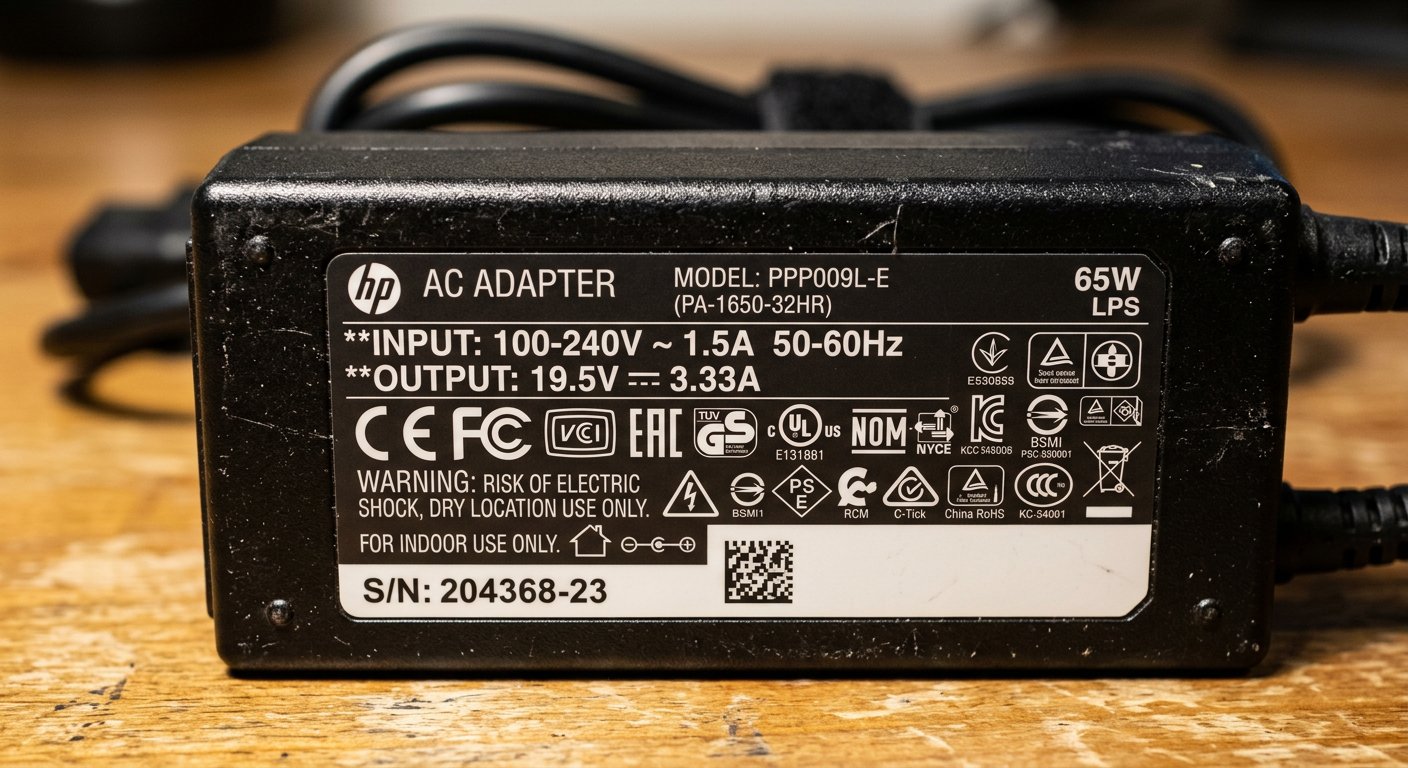
Universal chargers with wobbly tips, cords that get hot to the touch, and power rules. Shoe size versus water buckets, center pins, and why the third brass pin saves motherboards.
You travel to another town for a wedding or an office meeting, and when you open your bag, you realize you left your laptop charger plugged into the wall at home. You need to finish your work before evening. You hurry down to a roadside accessories kiosk in the market. The boy behind the counter reaches into a dusty drawer and hands you a bright cardboard box: 'Universal Laptop Charger.' Inside is a black brick with a sliding switch and eight different interchangeable plastic tips. You take it back to your hotel room, plug the loose plastic tip into your laptop, push the plug into the wall socket — and *snap!* A bright blue spark jumps with a loud pop, a smell of scorched plastic fills the air, and your laptop never powers on again.
Electricity is not magic; it follows simple physical rules that every computer user must know. On the back of every genuine charger brick, there is a small label with fine text. You only need to look for two letters: V for Volts, and A for Amperes. Think of them like shoes and water buckets, and you will never burn another machine as long as you live.
Shoe sizes and water buckets
Volts (V) is your shoe size. It must fit your foot EXACTLY. If the sticker on the belly of your laptop says '19.5V', your charger must be 19.5V. If you try to force a 24V charger into a 19.5V laptop, you are trying to force a size 46 man's boot onto a child's size 35 foot: the leather will burst. Inside the laptop, tiny electrical gates will puncture and blow out within half a second. Never, ever use a charger with higher voltage than your laptop asks for.

Amperes (A), on the other hand, is water in a bucket. Your laptop only drinks what it is thirsty for. If your laptop needs 3.3 Amperes, and your charger is a big, solid brick rated for 4.6 Amperes, that is completely safe and wonderful! The laptop drinks its 3.3 Amperes, and the extra amperage stays in the bucket as cool breathing room, so the charger brick stays warm instead of burning hot. But reverse the situation — plugging a small 2-Amp charger into a heavy laptop that needs 4.5 Amps — and that little charger brick will get so blistering hot you cannot hold it, and its internal wires will melt within weeks.
This is why cheap universal chargers are so dangerous: their loose plastic tips wobble in the socket. Every time you shift your legs or move the desk, the tip disconnects and reconnects ten times in one second, sending little electrical shockwaves directly into the motherboard. Furthermore, look at the plug that goes into the wall: it has two flat pins and one long brass pin on top. That long top pin is the earth pin. It drains stray electrical noise safely into the ground. If an electrician snaps that brass pin off with pliers to fit an old two-prong socket, you will feel a tingling, vibrating shock on your wrists every time you rest your hands on the metal casing.

- Voltage (V) must match your laptop's requirement exactly: higher voltage burns internal chips instantly.
- Amperage (A) can be equal or higher: higher amps keep the charger cool; lower amps cause overheating and melting.
- Avoid multi-tip universal chargers: buy an original second-hand OEM charger built specifically for your laptop model.
- Never cut off the third brass earth pin of a British plug: that pin stops tingling shocks on metal laptop bodies.
Clean electricity for the brain
Your laptop's brain thinks using tiny whispers of electric current moving billions of times every second. Feeding it dirty, unstable power from a cheap wobbly universal adapter is like putting contaminated petrol into an expensive car. Buy the heavy, original charger brick, protect its thick cord, and keep your machine safe. Next: the sudden blue screen of death, and why Windows crashes to save your work.