Computer skills from scratch·Spreadsheets and sharing·Lesson 77 of 180
Sharing a file without publishing it
 Ellis Dennis GrahamFounder, Cyber Elias Academy 2026-07-23 3 min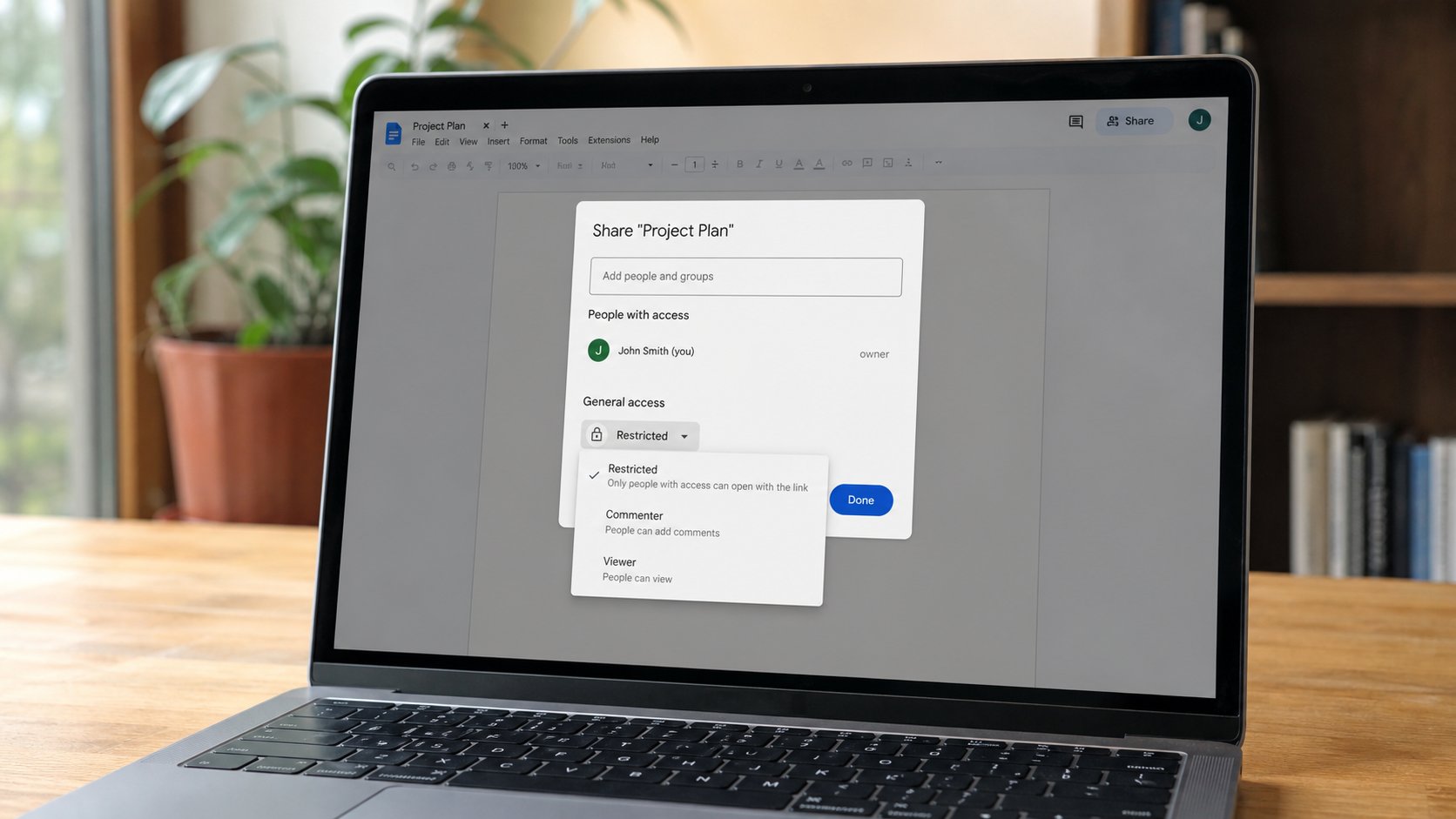
Anyone with the link is a public tray. A named email is a letter to one person. Viewer is enough for a receipt. Editor is a second pair of hands on your only copy.
Drive, Docs, and many portals offer Share. A box, an email field, a permission. People tick “anyone with the link” because it is fast, then paste the link in a WhatsApp group of forty, then wonder why a stranger commented. Anyone with the link is a tray on the street. A named address is a letter. This lesson is the box, Viewer versus Editor, and when a PDF attachment is still the kinder door.
Share, add the person's real email, choose Viewer if they only need to read, Commenter if they should mark, Editor if they must change the words. Send. They get mail with a link, if that address is a Google address that can open it. If they have no Google account, Viewer links can fail, or ask them to sign in. Then attach a PDF instead. Do not fight the cloud when the envelope still works.
Anyone with the link, and the group
Anyone with the link, Viewer, is for a poster you would tape on a gate — a timetable that is not private. It is not for a passport scan, a fee receipt with an account number, a CV with your phone. A link in a group chat forwards forever. You cannot un-forward. Restricted, named people, is how a receipt should travel. If the school asked for a link, Restricted, their address, Viewer. Then a short WhatsApp that says you shared it, as you learned when chat is a knock.
Editor on your only copy is two people in one letter. That is useful for a shared fee list in a family. It is how a cousin deletes a paragraph you needed. File, Make a copy, share the copy, keep the original in a folder they cannot see. You already know Save As. This is Save As for the cloud.

- Upload or create a practice doc that holds no secrets.
- Share it to your own second address as Viewer, Restricted. Open it from the other side.
- Look at Anyone with the link. Do not turn it on for this file. Know where the tap is.
- Remove the share when you are done practising. Share, the person, Remove.
Turning it off
Share, the list of people, Remove, or change Editor to Viewer. Anyone with the link: change back to Restricted. Old links then die for strangers. Copies people already downloaded do not die. A PDF you emailed is out of the house, as paper is. Share is not a spell. It is a door with a list. Keep the list short. Prefer Viewer. Prefer a name. Prefer a PDF when the other person only needs to read and print.