Computer skills from scratch·The workshop and the bench·Lesson 178 of 180
Upgrading RAM: the honest math
 Ellis Dennis GrahamFounder, Cyber Elias Academy 2026-09-21 4 min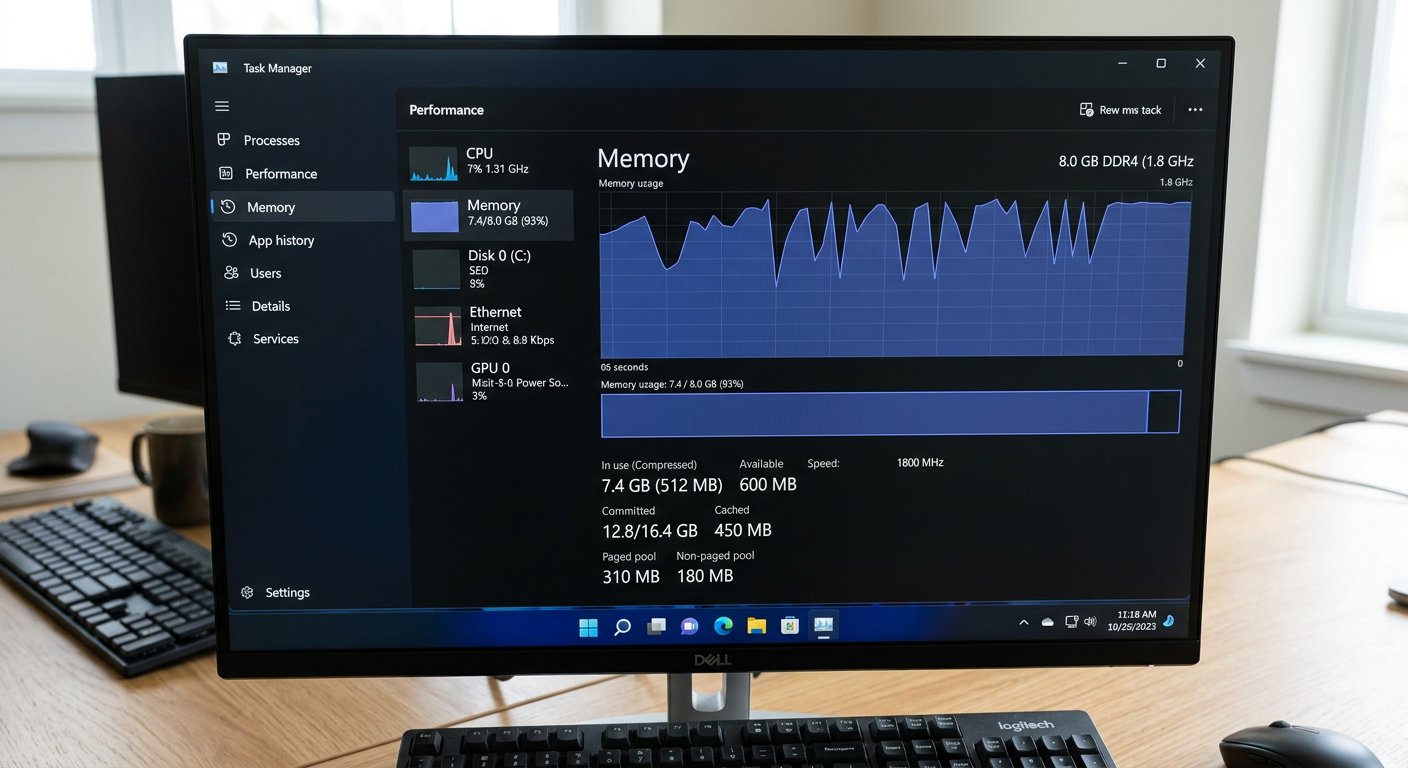
A friend shouts that you need sixteen gigabytes of RAM to make your computer fast. Reading the numbers before spending money, the study desk rule, and the soldered chip trap.
You are working on your laptop, and opening an Excel sheet takes thirty seconds. A friend leans over your chair, looks at the screen with an expert expression, and announces with great authority: 'Ah! Your RAM is too small! Go to the market and buy sixteen gigabytes of RAM; your laptop will fly like an aeroplane!' You believe him. You take thirty-five thousand naira out of your savings, buy a new green stick of memory, open the back of the laptop, click it in, and turn the machine on. You open Excel. It still takes thirty seconds. Nothing changed. You feel cheated, confused, and thirty-five thousand naira poorer.
Why did that happen? Because extra RAM only makes a computer faster if lack of RAM was the actual wall that was blocking it. Think of your computer like a student studying in a library. Your hard drive or SSD is the steel filing cabinet against the wall where thousands of books are stored. RAM (memory) is the wooden study table where you lay open the books you are reading right now. If you are reading only one notebook and one pen, having a study table the size of a football field does not help you read one word faster! You only need a bigger table when you have six heavy books open at the same time and pages are falling onto the floor.
The Task Manager truth and the soldered trap
Here is how to check your table size before spending a single kobo. Press three keys together: Ctrl, Shift, and Escape. That opens the Windows Task Manager — the dashboard that shows you everything your computer is doing right now. Click on 'Performance', then click on 'Memory'. Now use your laptop exactly as you do on your busiest workday: open your browser tabs, open your accounting sheet, open WhatsApp Web, and play music. Look at the numbers on the screen. If it says '3.8 GB of 8 GB in use', stop right there! Your desk is more than half empty! Adding another eight gigabytes of RAM will not make your computer one second faster. Your slow speed is caused by an old mechanical hard drive or heat, not lack of memory.

Only spend money on RAM if that Task Manager number consistently stays above eighty-five or ninety percent while you are working. And if you genuinely need more memory, beware the modern trap that catches thousands of buyers: soldered memory chips. In many modern slim laptops (especially thin budget models), the manufacturer did not include any slot for a memory stick! Instead, the chips are glued and soldered permanently directly onto the green board. Check online for your exact model number, or look at Task Manager where it says 'Slots used'. If it says 'Soldered' or has no open slot, you cannot upgrade the memory at all.

- Check Task Manager Memory under peak daily load: if usage stays under 75%, do not waste money buying extra RAM.
- A slow laptop is almost always suffering from an old mechanical hard drive, not lack of RAM: buy an SSD first.
- Verify your laptop has an open memory slot before purchasing: many modern thin laptops have non-upgradeable soldered chips.
- Memory generations cannot mix: DDR3, DDR4, and DDR5 have different notch positions and cannot fit into each other's slots.
Spend where the choke lives
Never buy computer parts based on street advice or loud opinions. Open Task Manager, look at the numbers with your own eyes, and spend your money where the real bottleneck lives. An SSD brings joy to ninety percent of older computers; extra RAM is only for the few whose desks are genuinely overflowing. Next: taking your machine to a commercial workshop without losing your parts or your privacy.