Computer skills from scratch·Everyday office·Lesson 56 of 180
WhatsApp Web on a computer
 Ellis Dennis GrahamFounder, Cyber Elias Academy 2026-05-31 3 min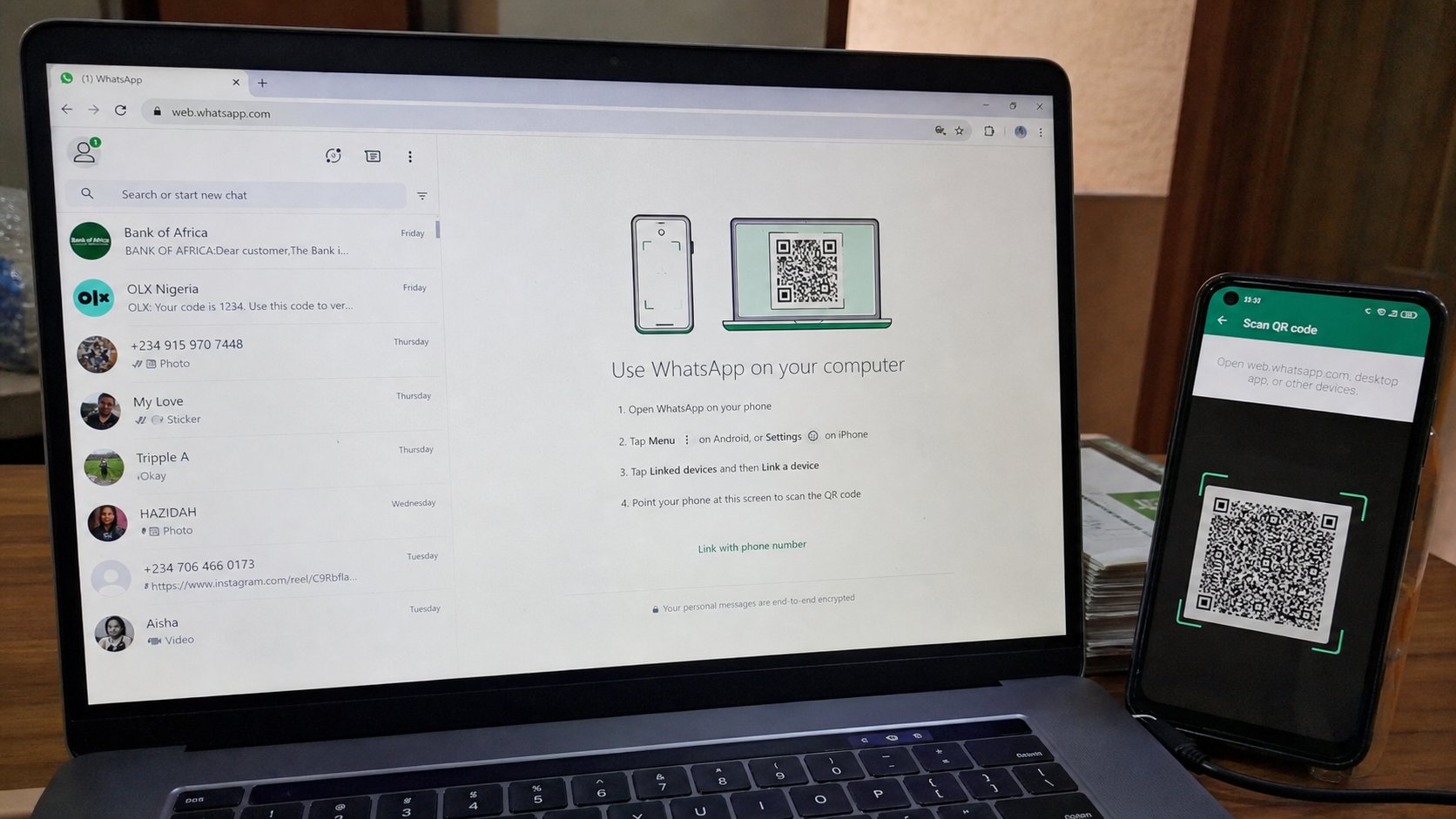
The green app can sit in a browser. The phone stays the key. Scan once, type with a keyboard, log out when the desk is not yours.
WhatsApp lives in the pocket. It can also live in a browser, with a real keyboard, so a long letter to a landlord is not thumbs. That sitting is WhatsApp Web — or the Desktop app, which is the same idea in a window of its own. The phone does not retire. The phone is the key. If the phone is off, the computer chat is off. This lesson is opening the door, keeping the phone awake, and shutting the door when you stand up.
Walk to web.whatsapp.com yourself. A square of dots waits. On the phone: WhatsApp, the three dots or Linked devices, Link a device, point the camera at the square. When the chats appear on the laptop, you are in. The phone must stay on the internet. A dead phone is a dead Web. Charge it. Do not put it in airplane mode to “save data” and expect the laptop to keep talking.
Typing, files, and two clocks
The list of chats is on the left. A click opens a thread. Type as you would in email, then Enter to send — or Shift+Enter for a new line, depending on the setting. Paperclip attaches a document from Documents, the house you know. Prefer Document for a PDF, not a camera picture, so the file does not become soup. You have heard that. It is louder on a laptop, where the real file is sitting next to you.
Blue ticks and “typing…” still come from the phone's network. If the laptop shows one tick and the phone shows two, wait. Do not send five times. Notifications may ring on both; that is two clocks. Mute one. The computer is for writing. The pocket is for the tap on the shoulder when you leave the desk.

- On your own laptop, open web.whatsapp.com. Link the phone.
- Send yourself a one-line message from the computer. Confirm it on the phone.
- Attach one small PDF as Document. Confirm it arrives readable.
- Log out from the laptop menu before you close if this machine is not only yours.
Log out, and other people's desks
The menu — three dots, Log out — ends this computer's handshake. Closing the tab is not always enough; a session can linger. On a business-centre machine, log out, then the five-minute walk from the signing-out lesson. Linked devices on the phone lists every computer still holding a key. Remove the ones you do not recognise. That list is worth a look after a café.
Do not link WhatsApp to a shop's “test” computer. Do not photograph your own QR and send it to a helper. The square is a key laid on the table. Anyone who scans it sits in your chats until you remove the device. Web is a keyboard for your pocket, not a copy of your life left behind. Type, send, log out. The green app goes back in the pocket, where it belongs.